
Reporting
Sage AI MCP server: use ChatGPT and Claude with your Sage data
Insights AI connects Sage 50 and Sage 200 to Claude, ChatGPT, Copilot or Gemini, so you can ask questions, build custom reports and spot trends in plain English.
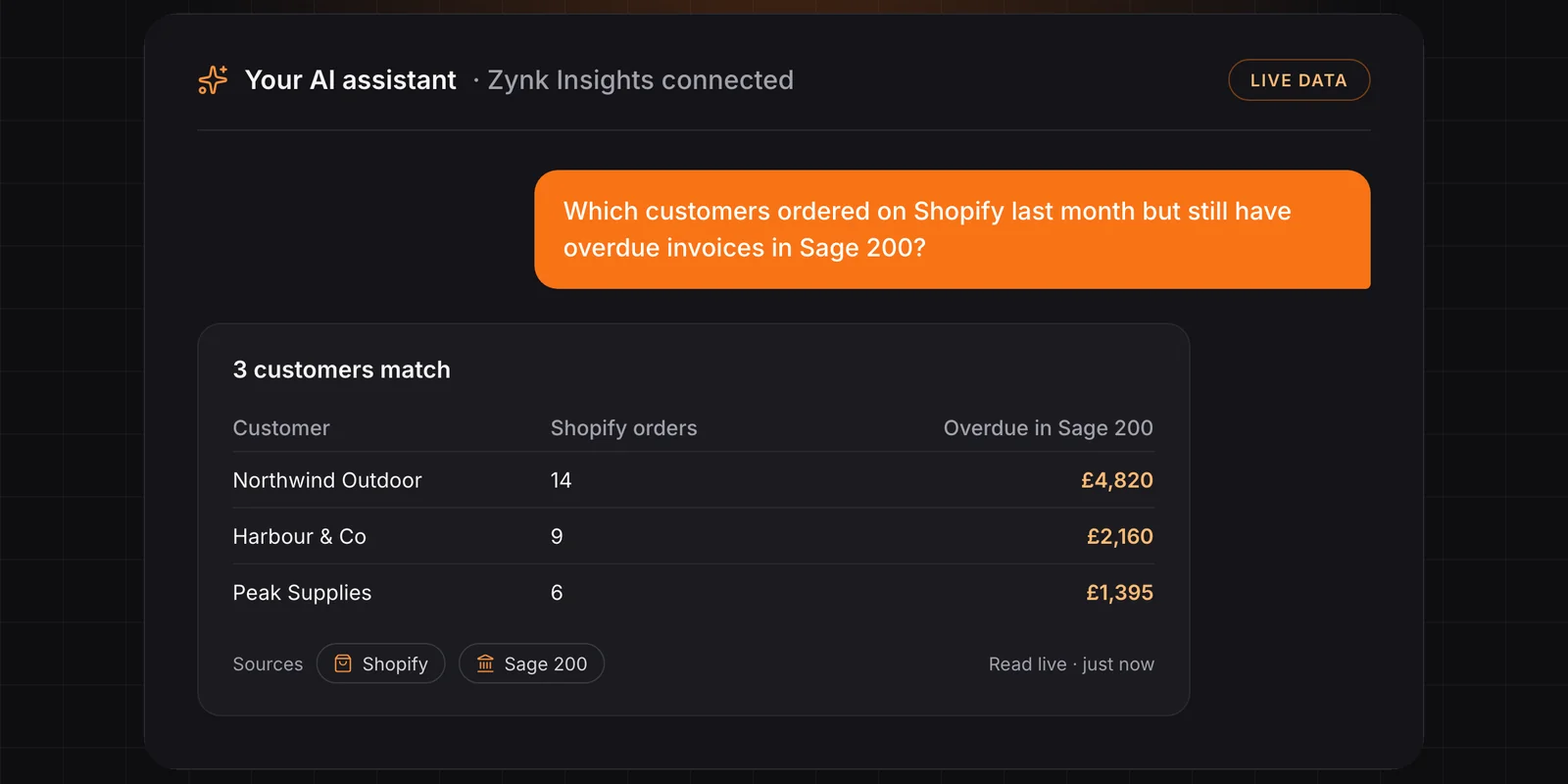
Your accounts know almost everything about your business: who owes you money, which customers are growing, where margins are slipping and how this quarter compares to last. The problem is getting it out. That usually means a report writer, an export to Excel and someone who knows where everything lives in Sage.
Insights AI, Zynk's Sage MCP server, changes that. It lets you talk to your accounting in plain English, in ChatGPT, Claude, Copilot or Gemini, and get a straight answer back.
What is a Sage MCP server?
MCP (Model Context Protocol) is the open standard AI assistants use to connect to business systems. An MCP server gives an assistant such as Claude, ChatGPT, Copilot or Gemini a set of tools it can use to read data safely from a system.
Insights AI is Zynk's MCP server, and it works with Sage. It gives your AI assistant a set of tools for working with your Sage data: looking up customers and suppliers, reading invoices, transactions and balances, and summarising activity over time. You ask the question, and the assistant decides which tools to use to answer it.
Which Sage products does the Sage MCP server support?
For Sage, Insights AI supports:
We will be adding more Sage products over the coming months. If you run a different Sage product, talk to us about the roadmap.
Talk in English to your accounting
You don't need to learn a report writer or remember nominal codes. Type the question the way you would ask your finance team:
- "Which customers are more than 60 days overdue, and how much do they owe?"
- "How do sales this quarter compare to the same quarter last year?"
- "Who were our top 20 customers by revenue last year, and who has stopped ordering?"
- "Show me supplier spend by month for the last 12 months."
- "What is our cash position likely to look like at the end of the month based on what's due in and out?"
The answer comes back in seconds, read live from Sage, with the records it came from so you can check the figures.
Build custom reports without a report writer
The questions you ask regularly can become reports. Ask the assistant to lay out aged debt by customer, sales by product group or margin by month, and it will build the table, chart or summary for you. You can then refine it in the same conversation: "split that by region", "only show customers over £10k", "add last year for comparison".
There are no templates to design and no exports to tidy up, and there is no waiting for someone with Sage reporting skills to find time.
Analyse trends, not just totals
Totals tell you where you are. Trends tell you where you're heading. Because the assistant can call the Insights AI tools repeatedly across different periods, it can:
- Track sales, margin and spend over time and point out what's changed
- Spot customers whose ordering or payment behaviour is slipping
- Compare periods, customers, products or suppliers side by side
- Flag unusual movements worth a closer look before month end
Secure by design
Insights AI is read-only. It never writes back to Sage. It only sees what your existing Sage permissions allow, and your data stays in Sage rather than being copied into another database. Every answer can be traced back to the source records. For the full picture, including what ChatGPT and Claude do with your conversations and what GDPR asks of you, read is it safe to connect Sage to AI?
Beyond Sage: a 360-degree view of your business
Your accounts tell part of the story. The rest lives in your CRM, your ecommerce store and your web analytics. Zynk's platform already connects hundreds of business systems, so you can bring those into the same conversation as well.
Ask which marketing campaigns produced paying customers, whether your pipeline will cover next quarter's targets, or where web traffic turned into invoices. One question gets one answer, drawn from every part of the business. See automated reporting and CRM integration for where this can go.
How to connect Sage to Claude, ChatGPT, Copilot or Gemini
- Connect Sage. Link Sage 50 or Sage 200 using your existing logins and permissions.
- Add Insights AI to your AI assistant. Connect it to Claude, ChatGPT, Copilot or Gemini.
- Start asking. Ask your accounts anything, then turn the answers you need regularly into reports.
For the step-by-step in each assistant, see how to connect Sage to ChatGPT, Claude, Copilot or Gemini.
Sage MCP server FAQs
What can I ask the Sage MCP server?
Anything your Sage data can answer: aged debt, sales by customer or product, supplier spend, cash due in and out, and how any of these have changed over time.
How much does the Sage MCP server cost?
Insights AI starts at £49 a month for up to 2 connected sources, 1 user and 500 AI requests, with no setup fees. Larger plans add more sources, users and requests. See Insights pricing.
How long does it take to set up?
Minutes, once Insights AI can reach your Sage company. You connect Sage 50 or Sage 200 with your existing logins and permissions, add Insights AI to your AI assistant, and start asking.
Which AI assistants work with Insights AI?
Insights AI works with AI assistants that support MCP, including Claude, ChatGPT, Copilot and Gemini.
Can the AI change my Sage data?
No. The Sage MCP server is read-only and never posts, edits or deletes anything in Sage.
Is it safe to use with ChatGPT or Claude?
Insights AI itself is read-only and works within your Sage permissions. The other half is your assistant: business plans of ChatGPT and Claude don't use your conversations to train their models by default, while personal plans have their own settings. Our guide on connecting Sage to AI safely covers both, plus GDPR.
Does my Sage data get copied somewhere else?
No. Answers are read live from Sage when you ask, using your existing permissions. There is no separate data warehouse.
What are the alternatives to a Sage MCP server?
Sage Copilot, built into some Sage products, exporting to Excel or a BI tool such as Power BI, a traditional report writer, or building your own MCP server. Each suits a different need, and we compare them honestly in Sage AI tools compared.
Do you support Sage Intacct or other Sage products?
Sage 50 and Sage 200 are supported today, and more Sage products are coming over the next few months. Contact us to find out when yours will be added.
Book a demo to see Insights AI working with your own Sage data, or explore the product.
See how Zynk fits your systems
Book a 20-minute call and we'll map out how Zynk connects the systems your business runs on.
Book a call